
 AI
Development
AI
Development
 Shopify
 Magento Open Source
 Adobe Commerce
 WordPress
 B2B Excellence





Build vs Buy vs Compose: Which Should You Choose?


As businesses grow, they inevitably arrive at the same technology fork in the road. Do we build the software we need? Buy an existing platform? Or do something in between?
The build vs buy decision has implications far beyond your startup budget. Will your teams be able to work effectively? Can your technology scale with your growing business? And perhaps most importantly, does this solution put you in control, or leave your business at the mercy of software?
While SaaS platforms can provide instant access to functionality, bespoke software allows you to tailor your technology to fit your exact requirements. But how do you choose between build vs buy software?
Let’s take a closer look.
Build vs Buy vs Compose: Understanding the Options
Building software means commissioning a custom application designed around your own workflows, where you own the code, the data, and the roadmap.
Building software gives you maximum control over functionality and user experience. You can tweak code, change back-end workflows and adjust data architecture to suit specific needs within your business.
Examples of custom software include tailored customer portals, internal operations tools, e-commerce sites, or any web application built from scratch.
Buying software refers to licensing an existing product or subscribing to a SaaS platform. You use software built by someone else, then configure it to match your requirements.
CRM systems, accounting software, project management tools and e-commerce platforms are all examples of software that can be bought instead of built internally.
Composing software means taking elements of both approaches and combining different APIs, platforms and custom-built tools to fit your specific needs.
For example, an organisation may use an established e-commerce platform alongside a third-party logistics tool, complementing these off-the-shelf capabilities with a custom application that manages part of its unique workflow.
Build vs Buy vs Compose
| Factor to Consider | Building Software | Buying Software (SaaS) | Buying + Building (Compose) |
| Cost | Requires a significant upfront investment | Initial costs are usually lower with SaaS | Moderate costs depending on integrations |
| Speed | Longer development timeframe | Quick to deploy, particularly with SaaS | Solution can be rolled out in stages |
| Flexibility | Highly flexible since it’s built around your unique workflows | Functionality is limited to built-in features, although some platforms allow customisation | Flexible where you develop your own software |
| Scalability | Software is designed around your business, making it easier to scale | Depends on the provider’s platform and your subscription plan | Can scale well if architected correctly |
| Maintenance | Your in-house team owns maintenance responsibilities | The service provider maintains the core product | Split between internal teams and third-party vendors |
| Control | You own your data and technology stack | The platform you choose will have its own policies and limitations | Owned components give you control; purchased platforms do not |
| Customisation | Every aspect of your software can be tailored to your needs | Purchased software can often only be configured or customised using approved plugins | Customise components that provide strategic value |
Buyers often like SaaS platforms because they have lower upfront costs. But what looks like a cheap product could become expensive when you subscribe, add more users, upgrade for premium features and pay for additional integrations.
Conversely, custom software has a high initial price tag. But if you’re currently using disparate tools, workarounds or manual processes, your business could save money by building once and then owning the software you use every day.
A composed approach combines both philosophies. Instead of rebuilding what already exists, connect low-code tools and purchased platforms where they make sense, then only build the parts of your stack that provide a strategic advantage.
Note: The low-code adoption statistic in the original draft is still a placeholder. I would not publish that sentence until the figure, year and original source have been verified.
When to Build Software
Building custom software can offer compelling benefits. But it rarely makes sense to start from scratch for every need your business has.
Instead, ask yourself these questions when deciding whether to build an app or use an existing solution.
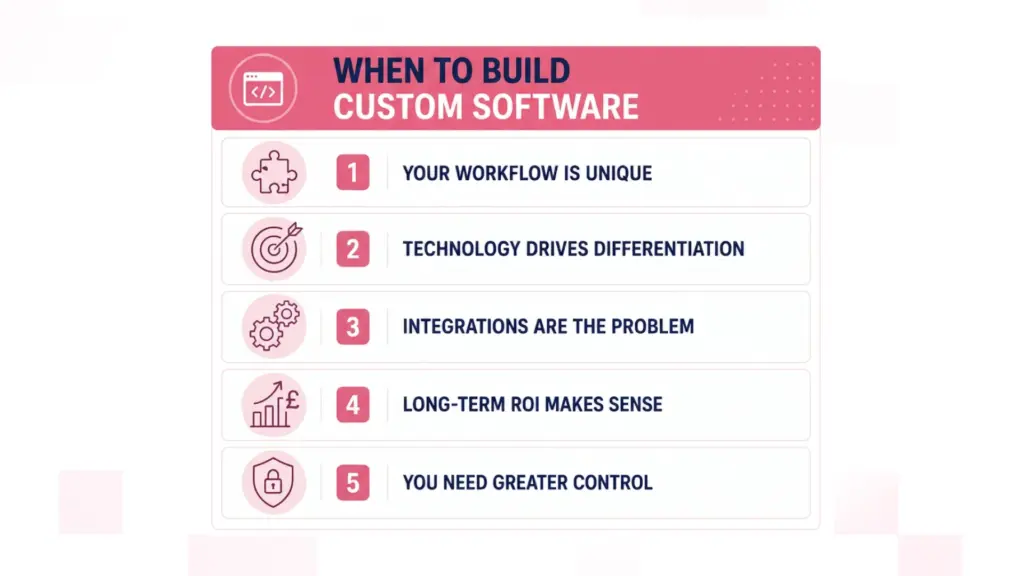
When are your business needs too unique for SaaS?
Would your team struggle to adapt to a new platform? Do you have custom workflows that deliver measurable value for your customers?
There’s no tool available that supports your process without extensive workarounds or a custom build.
If so, building software may be right for you.
The software you own gives your business a competitive advantage
Some parts of your technology stack are important, but not strategic.
That sentiment doesn’t apply to the things that differentiate your brand in the eyes of your customers. Building an app gives you an opportunity to own more of the customer experience.
Whether that’s your quoting process, internal operations or a unique service offering.
Integrating multiple SaaS products is causing headaches
Once a stack passes roughly 8 to 10 connected tools, integration and data-sync effort usually grows faster than the value each new tool adds.
You might rely on cumbersome spreadsheets, manual exports or costly middleware just to communicate between systems.
Developing a custom integration layer could solve your problems. Alternatively, you could build a single application to serve as a centralised point of contact for your workflows.
When do SaaS subscription costs justify building your own software?
Everyone loves a good free tool. Until you realise you need premium support, extra users and fancy add-ons to do your job.
If your business spends thousands on subscriptions every year, along with customisation fees, it may pay off to own your software outright.
Being locked into expensive SaaS subscriptions is no longer sustainable.
You need more control over your data or technology
Perhaps you’ve experienced first-hand what happens when your software provider goes bankrupt.
Or maybe your organisation needs complete control over data permissions, user roles, integrations and future development.
If you’ve asked yourself any of these questions, building might be the way to go.
When Not to Build Your Own Software
I know what you’re thinking: if there’s a problem, we should build!
Here’s when buying software makes more sense.
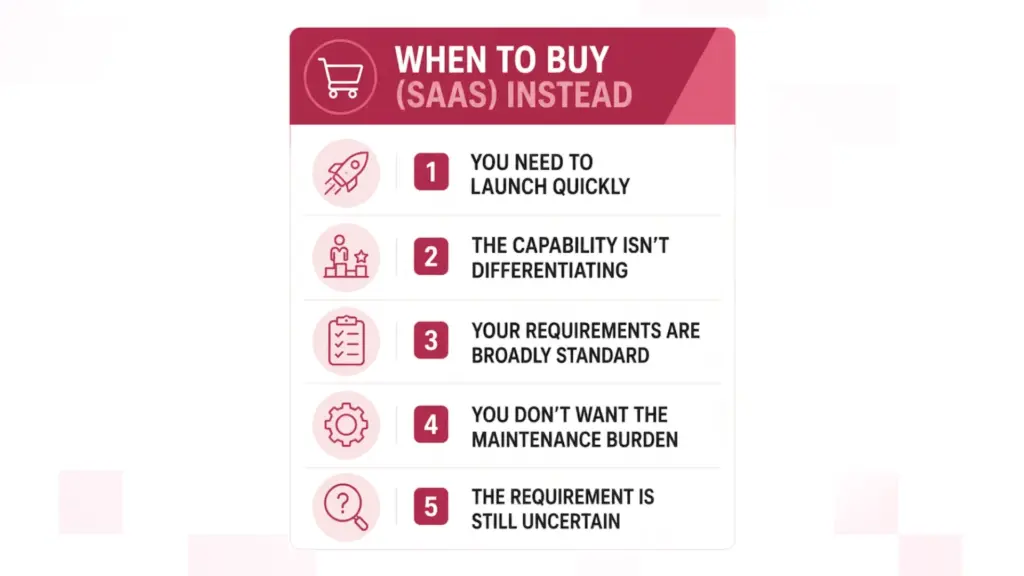
The function you need isn’t a competitive differentiator
Do you really need a bespoke solution for payroll, video calls or document signing?
Buy it. There’s a good chance someone has already solved your problem.
Business requirements have changed, but your software hasn’t
Every business encounters this at some point.
You start with a process in place, only to realise it doesn’t quite work once you’ve selected your software.
How fast can you launch: buying vs building?
Custom software takes time to develop. SaaS solutions can be purchased and configured much faster.
When your business needs a solution now, buying may make more sense.
Most of your requirements can be met through configuration
Every business has unique requirements. That doesn’t mean custom software is the only way to meet your needs.
If 80% of your requirements can be met through configuration, buy the software and adapt your workflow.
You’re not sure who’ll own maintenance or security updates
Let’s say you build an application that only your marketing department uses.
Who handles maintenance? Security updates? Technical issues?
Taking ownership of software involves ongoing administration. Are you sure you want to own it?
Building custom software is the right decision sometimes. When weighing up build vs buy options, consider the long-term value to your business. There should always be a justifiable reason for building an app from scratch.
Build vs Buy: Compose Me a Solution
Somewhere between these two options is composition: buying capabilities that already exist, then building your way around them.
Think of composable architecture as borrowing ingredients from different meals. You like pizza but hate preparing dough from scratch. So you buy pre-made dough, sauce, cheese and toppings. Then build the meal you want by combining them yourself.
A Wholesale Business with an ERP System
Here’s a real-world example. Say you run a wholesale business with a robust ERP system that your entire operation relies on.
Buying a new ERP would be costly and risky. But your sales team struggles with creating quotes in the current system.
You don’t need to rebuild the ERP or make salespeople use an unfamiliar tool. Instead, you could:
- Keep your existing ERP as a system of record.
- Use APIs to extract the data you need.
- Build a custom application for creating quotes.
- Add a hosted document-generation tool to format quotes as PDFs.
- Connect everything using a well-designed integration layer.
The same principle applies to custom software development. Use low-code platforms to create a minimum viable solution, then develop custom software where you absolutely need it.
For instance, you may start with a low-code application for back-end workflows but build a custom React frontend that customers interact with.
The trick with composing software is discipline. Just because you can connect tools doesn’t mean you should.
Architect your stack with integration in mind. Plan for data governance, configure security standards and decide who owns what before going too deep. Composition without rules is just another form of technology sprawl.
Exploring Software Development for Your Business?
Our Experts Can Help!
Build vs Buy Decision Framework
Deciding between build vs buy software doesn’t have to be difficult. Take an objective look at your requirements against each of these points.
Score each option out of 5, then compare your totals.
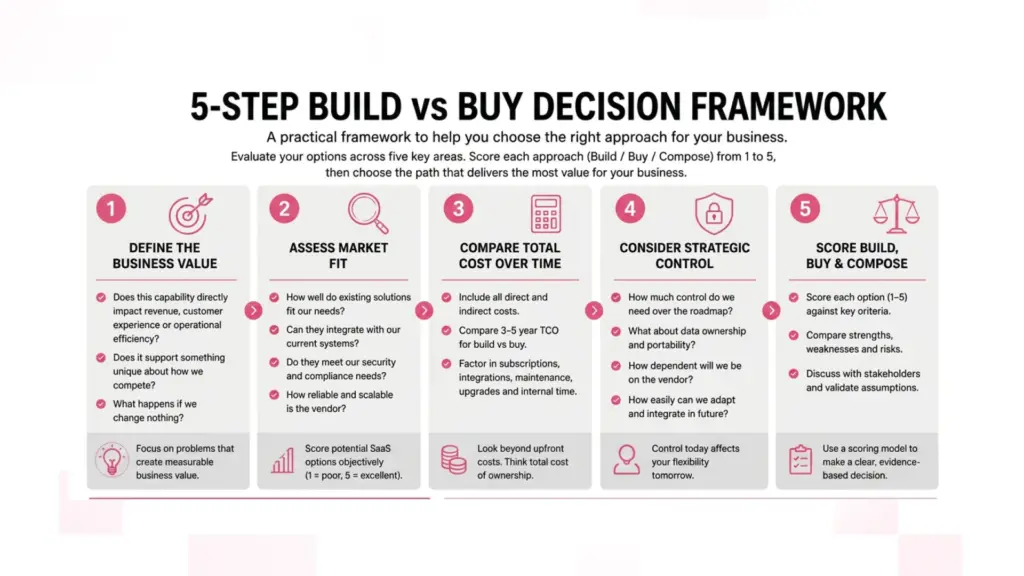
Step 1: Identify the Business Value
Ask yourself:
- Will this tool improve our customer experience, help us operate more efficiently or increase revenue?
- Does it support something unique about how we do business?
- What would happen if we made no changes?
Use this step to understand what you’re trying to achieve. Not every problem needs a custom software solution.
Step 2: Evaluate Market Fit
Make a list of software products that meet your basic requirements. Then score each product against these categories:
- Functional fit
- Integration options
- Data accessibility
- Security/compliance considerations
- Ability to scale
- Vendor track record
Some SaaS platforms have impressive feature lists. But how easy are they to integrate? Can you access data freely? Understand the bigger picture when researching new tools.
Step 3: Calculate Cost Over Time
Try to estimate the total cost for each option over three to five years.
For bought solutions, include:
- Subscription fees
- Implementation costs
- Premium modules/features
- Cost of additional users
- Integration costs
- Internal administration
For software builds, include:
- Discovery/architecture phase
- Development costs
- Testing
- Software infrastructure
- Security
- Maintenance/upgrades
- Future enhancements/add-ons
Step 4: Define Strategic Control Requirements
Just how much control does your business really need?
Consider each option against these questions:
- Control over the product roadmap
- Data portability
- Dependency on the vendor, if any
- Ability to customise
- Ability to integrate new technology in the future
Step 5: How do you score build vs buy vs compose?
Don’t overthink this section. Use a simple scoring model, like:
| Decision Criterion | Build | Buy | Compose |
| Strategic differentiation | /5 | /5 | /5 |
| Speed to launch | /5 | /5 | /5 |
| Long-term cost | /5 | /5 | /5 |
| Integration requirements | /5 | /5 | /5 |
| Control and flexibility | /5 | /5 | /5 |
| Maintenance capacity | /5 | /5 | /5 |
| Future scalability | /5 | /5 | /5 |
Highest score wins.
Disclaimer: The framework with the highest score isn’t always correct. Instead, this exercise should force you to consider the trade-offs before your business commits to a new technology direction.
Build vs Buy? RVS Media Has Seen It All
Here at RVS Media, we don’t sit down with every client and say, “Let’s tear everything down and start over.”
We take inventory of the end goal, current tech stack, databases and the workflows that are creating bottlenecks.
Guided by Founder and Technical Lead Rajeev Nar’s years of experience in the industry, our team helps you identify where custom software development can provide value versus an out-of-the-box platform that simply does the job.
Need Custom Software Development?
You may want to build on your existing e-commerce platform as a retailer. Rather than replacing it completely, build APIs and custom applications that make your e-commerce experience unique.
Another business may come to us with complex internal workflows, requiring a custom app or “glue” layer to integrate disparate systems.
It’s all about finding a balance. Don’t over-engineer a problem that can be solved with a SaaS subscription. Don’t lock yourself into software that will hold your maturing business back.
Conclusion
Should you build or buy software? There are three options: build it yourself, buy an existing solution or compose your own with custom software.
Deciding between build vs buy software is easy when you know how. Build when you absolutely need technology to do something unique for your business. Buy when the product fits your requirements and saves you time. Compose when you understand your workflow well enough to pick off-the-shelf tools, then fill in the gaps with custom software.
Compare total cost, business requirements and strategic value to make the best decision for your business. Not sure where to start? Let RVS Media evaluate your current tech stack and provide guidance. Get in touch today.
It really depends on how you define total cost. Purchasing software is often going to be less expensive upfront. However, license fees, new integrations and premium support can become costly. Custom software is going to cost more initially but could offer you better bang for your buck if your team is already using workarounds.
SAAS stands for software as a service. Custom software refers to a solution that is built from the ground up to fulfil your business needs.
Buying is faster. SaaS can be live in days to a few weeks, while custom builds typically take 3 to 9 months depending on scope. A composed approach usually lands in the middle, with a working first release in 6 to 12 weeks.
Yes. This concept is known as a composable approach to technology. Instead of completely rebuilding existing software, buy standard capabilities and then augment them with custom software where you need flexibility.
If your business-critical workflows can’t be adapted to suit an out-of-the-box software solution, building may be the better option. Building gives you flexibility that purchased platforms often can’t match.