 AI
Development
AI
Development
 Shopify
 Magento Open Source
 Adobe Commerce
 WordPress
 B2B Excellence





How To Set Up a Facebook Shop: A Complete Guide for Ecommerce Brands



A Facebook Shop is a Meta-hosted storefront that lets customers browse your product catalogue on Facebook and Instagram and buy on your website or, where eligible, inside Meta. It runs on Meta Commerce Manager, which connects your catalogue, shop, product data and commerce assets in one place.
However, Facebook Shop setup in 2026 is not the same process many older tutorials describe. Meta has changed its commerce infrastructure, checkout experience and integrations, so following a 2021 guide can leave you looking for settings that no longer exist.
This guide explains how to set up a Facebook Shop using the current Meta Commerce workflow, connect your ecommerce catalogue and prepare your shop for sales.
Quick Answer: How to Set Up a Facebook Shop (2026) – Create a Facebook Business Page, open Meta Commerce Manager, add your product catalogue, choose checkout, set up your shop, create collections, then publish. Setup takes 1–3 hours, and approval usually takes 24–48 hours.
- You need a Facebook Business Page to set up a Facebook Shop.
- Meta Commerce Manager is the central workspace for managing commerce assets and catalogues.
- Most merchants use website checkout; in-app Meta checkout is limited to eligible merchants in supported markets.
- Shopify, WooCommerce and other ecommerce platforms can synchronise product catalogues with Meta.
- Product data quality directly affects catalogue approval, discoverability and advertising performance.
- A Facebook Shop works best as part of a wider ecommerce strategy rather than as a replacement for your main online store.
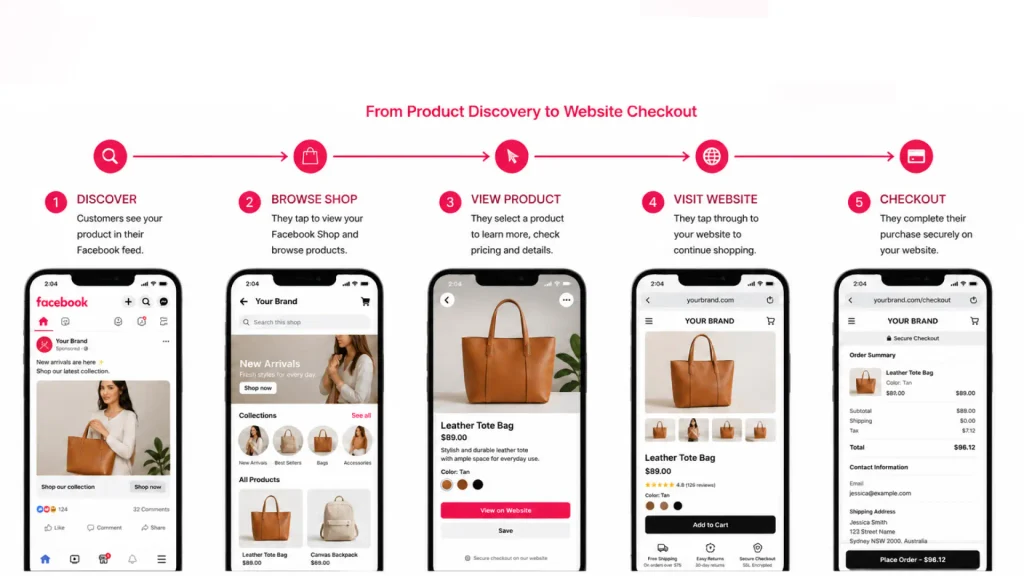
What Is a Facebook Shop? (And Why Ecommerce Brands Need One in 2026)
Every Facebook Shop is built from three parts: a commerce account that holds your business assets, a product catalogue that feeds product data into Meta, and a checkout route that sends the customer to your website or an eligible in-app checkout.
For ecommerce brands, the value is less about creating another standalone website and more about shortening the distance between product discovery and purchase intent.
The Meta “From Scroll to Chat to Cart” report highlights that Reels, creators, AI, and messaging are driving a major shift toward a “scroll-led discovery” model in India. Read the full story at Meta Newsroom.
Meta no longer publishes a global count of active Facebook Shops, so treat ‘millions of shops’ figures in older articles as unverified. Conversion benchmarks also vary significantly by methodology, traffic source and industry, so your own catalogue, funnel and customer data are more useful than a generic social-commerce percentage.
What Do You Need Before Setting Up a Facebook Shop?
You need more than a Facebook profile to build a functioning ecommerce presence.
A personal profile cannot serve as the commercial foundation for a Facebook Shop. You generally need a compliant Facebook Business Page, a business presence within Meta’s business infrastructure, eligible products and a product catalogue. Your website, domain and business information should also be ready if customers will complete purchases on your website.
Facebook Shop Setup Checklist (11 Requirements)
Before starting your Facebook Shop setup, prepare:
- A Facebook Business Page
- A Meta business portfolio
- Business and contact information
- An eligible product catalogue
- Product images, descriptions and prices
- Shipping and returns information
- A verified business domain where required
- An ecommerce website if using website checkout
- An eligible ecommerce platform integration, if applicable
- An Instagram professional account if you want Instagram Shop integration
- Products that comply with Meta Commerce Policies
How Do You Create a Facebook Business Page for a Shop?
Your Facebook Business Page is the foundation for your Facebook for Business ecommerce presence.
How to Create Your Page
From Facebook or Meta Business Suite:
- Choose the option to create a new Page.
- Enter your business name.
- Select the most relevant business category.
- Add your business description and contact information.
- Create a unique Page username.
- Upload your logo as the profile image.
- Add a branded cover image.
- Add your primary call-to-action button.
- Connect relevant business assets and permissions.
The interface can change as Meta updates Business Suite, so focus on the underlying assets rather than following screenshots from older tutorials.
Optimising Your Page for Sales
Treat the Page as an ecommerce entry point rather than an online brochure.
Your Page should immediately communicate:
- What you sell
- Who your products are for
- Where customers can buy
- How customers can contact you
- Why customers should trust your brand
Use consistent branding across your Page, website, product catalogue and Instagram account. Your username should also be easy to remember and closely aligned with your brand.
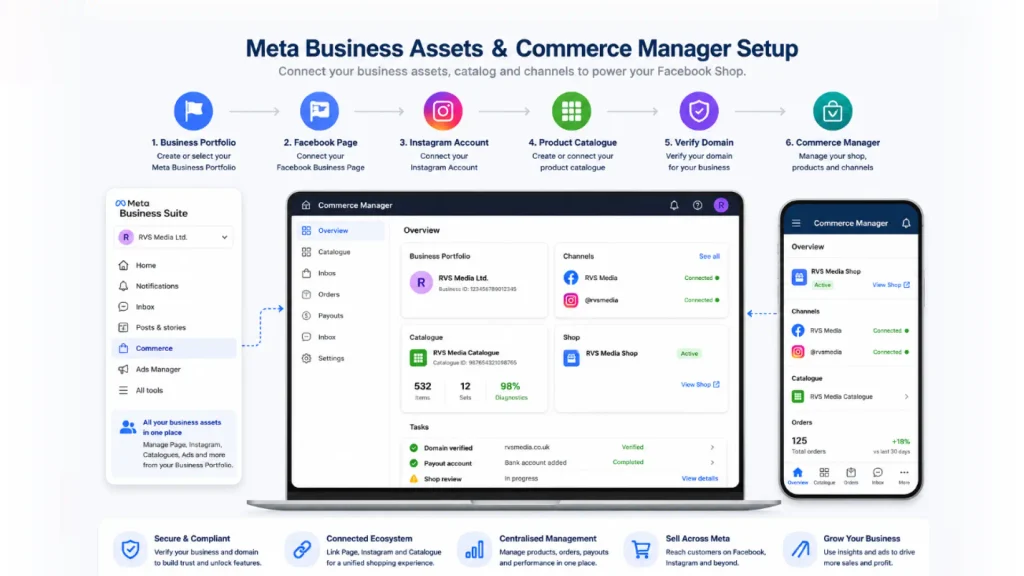
How Do You Set Up Meta Commerce Manager?
Meta Commerce Manager is the central workspace for managing catalogues and commerce activity across Meta technologies. Meta’s current catalogue guidance covers catalogue creation, product management, troubleshooting and product promotion through Commerce Manager.
Create or select the appropriate business portfolio, then:
- Open Commerce Manager.
- Select or create your commerce account
- Connect your Facebook Page.
- Connect Instagram if required.
- Create or connect your product catalogue.
- Review business verification requirements.
- Verify your domain where required.
- Check account and commerce policy status.
- Resolve any outstanding restrictions before submitting your Shop.
Do not wait until the end to discover that a business asset, domain or product is restricted. Check account quality and catalogue health during setup.
Which Checkout Method Should You Use, Website Checkout or Meta Checkout?
Checkout is one of the biggest areas where older Facebook Shop guides become misleading.
In 2026, the experience depends on your country, account eligibility and ecommerce platform. Website checkout is a major route, while Meta continues to test or provide direct checkout capabilities to eligible merchants and platforms. Shopify, for example, currently describes direct checkout on Meta surfaces as being in limited release.
| Checkout option | How it works | Best suited to |
| Checkout on Facebook/Instagram | Eligible customers complete the transaction within a Meta experience | Eligible merchants and supported markets |
| Checkout on your website | Customer discovers the product on Meta and completes payment on your ecommerce site | Most D2C and multichannel brands |
| Message-led purchase | Customer contacts the business through messaging to discuss or arrange a purchase | Businesses with assisted-sales journeys |
For website checkout, make sure the destination URL creates a coherent shopping journey. Current Meta integrations can require a checkout URL capable of receiving product and quantity information.
RVS Media tip: For established ecommerce brands, website checkout often gives you greater control over merchandising, analytics, CRO, customer data and the wider post-purchase journey.
Which Shop Details and Currency Settings Do You Need to Configure?
Enter your business details, customer service information, shipping settings and returns information carefully.
Pay particular attention to currency. Your catalogue’s currency affects how prices are interpreted and displayed, and changing core catalogue settings later can create significant operational complications. Confirm the correct market, currency and pricing structure before importing a large catalogue.
Also prepare:
- Customer service email
- Customer service channels
- Shipping information
- Returns and refund policy
- Privacy policy
- Website checkout URL
- Delivery regions
- Tax information where applicable
Do not publish first and fix these details later. Commerce systems work much better when the commercial foundations are correct before products are submitted.
How Do You Connect a Product Catalogue to a Facebook Shop?
Your catalogue is the engine behind your Facebook Shop.
Adding Products Manually
For a small catalogue, you can add products through Commerce Manager. Depending on your workflow, this can include individual product entry or structured feed uploads.
At minimum, prepare accurate:
- Product title
- Product description
- Product URL
- Price
- Currency
- Availability
- Product images
- SKU or product identifier
- Brand
- Product category
- Shipping information where required
Use clear, high-resolution product photography. A 1,024 × 1,024 image is a practical working standard for ecommerce assets, although the exact technical requirements can vary by Meta product surface and feed method.
Syncing via Ecommerce Platform (Shopify, WooCommerce, BigCommerce)
For anything beyond a small catalogue, automated synchronisation is usually the safer approach.
Common ecommerce integrations and partner workflows include Shopify, WooCommerce, BigCommerce, Wix and other commerce platforms. WooCommerce’s current Meta integration, for example, provides catalogue synchronisation and Commerce Manager controls for products, catalogue health and related settings.
Shopify’s Meta integration also synchronises product data into the Meta catalogue and uses product information such as Google Product Categories for discoverability and eligibility.
RVS Media works across Shopify, WooCommerce, BigCommerce and Adobe Commerce, which means catalogue architecture can be considered alongside your wider ecommerce platform rather than treated as an isolated social-media task.
Need help connecting your store?
Our Experts Can Help!
How Should You Organise Products into Collections?
Use collections to create logical shopping paths such as:
- New Arrivals
- Bestsellers
- Seasonal Products
- Gifts
- Sale
- Women’s Collection
- Men’s Collection
- Accessories
Build collections around how customers shop, not how your internal product database is structured.
The exact collection limits and presentation options can change with Meta’s commerce interface, so avoid relying on older claims that every collection must contain a specific number of products.
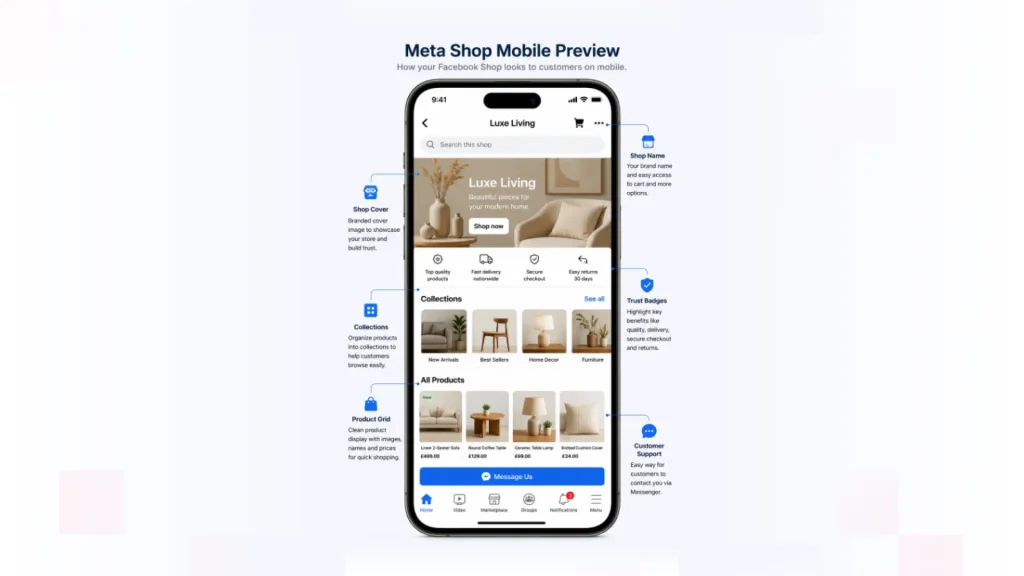
How Do You Customise Your Facebook Shop’s Appearance?
Your catalogue tells Meta what you sell. Your Shop presentation tells customers why they should care.
Where the current interface provides the relevant options, configure your:
- Shop branding
- Cover imagery
- Product groupings
- Collection presentation
- Visual hierarchy
- Mobile experience
Prioritise mobile viewing. Social commerce begins inside a feed, often with a customer moving quickly between videos, posts, product pages and conversations.
How Do You Publish and Promote Your Facebook Shop?
Before publishing, complete a final ecommerce test.
Publishing Checklist
- Confirm all product prices.
- Check stock availability.
- Test product links.
- Verify images.
- Check product variants.
- Confirm shipping information.
- Review return policies.
- Check catalogue warnings and rejected products.
- Test the checkout journey.
- Review the Shop on mobile.
- Confirm Facebook and Instagram connections.
Then build traffic around the Shop.
Organic Promotion
Use:
- Shoppable posts where available
- Product-focused Reels
- Stories
- Creator and UGC content
- Product demonstrations
- Customer reviews
- Educational content
- Messenger conversations
Paid Promotion
Use Meta Ads Manager to connect catalogue products with your paid acquisition strategy. Depending on eligibility and campaign setup, ecommerce brands can use catalogue-based advertising, Advantage+ shopping campaigns and retargeting to reconnect with people who have interacted with products or the website.
The important principle is simple: do not advertise a broken product experience. Fix catalogue quality, landing pages and checkout friction before increasing spend.
Best Practices for Selling on Facebook Shops (2026)
- Keep inventory synchronised. Aim for consistently accurate stock data to reduce overselling and product disapprovals.
- Use lifestyle imagery. Social feeds are visual environments, so show products in realistic contexts rather than relying exclusively on isolated packshots.
- Connect Instagram where eligible. A unified catalogue can support product discovery across Facebook and Instagram.
- Use genuine UGC. Real customer experiences can provide context that studio photography cannot.
- Optimise product titles. Make the product immediately understandable rather than filling titles with repetitive keywords.
- Audit catalogue health regularly. Review rejected products, missing attributes and synchronisation errors.
- Automate customer responses. Use Messenger automation for common questions around availability, delivery and product information.
- Measure the complete journey. Track discovery, product views, clicks, add-to-cart activity and completed purchases rather than engagement alone.
- Keep your website checkout fast. If Meta sends customers to your website, the final conversion experience is still your responsibility.
- Treat Meta as part of your ecommerce ecosystem. Your Facebook Shop should complement your website, CRM, email, SEO and paid acquisition strategy.
Common Mistakes to Avoid
Using a personal Facebook profile
A personal profile is not a substitute for the business infrastructure required for ecommerce.
Following an old Facebook Shop tutorial
Meta has changed its commerce workflow considerably. Older guides can reference menus, checkout processes and settings that no longer apply.
Uploading poor catalogue data
Incorrect prices, missing categories, unavailable products and inconsistent product information can create approval and customer-experience problems.
Ignoring regional eligibility
Meta commerce features are not identical in every market. Checkout, Shops and product-tagging capabilities can vary by country and account eligibility.
Treating the Shop as the whole ecommerce strategy
A Facebook Shop can generate discovery and buying intent, but it does not replace a strong ecommerce website, fulfilment operation, customer service process or retention strategy.
Conclusion
A Facebook Shop can look deceptively simple from the outside: a product, a photo, a price and a button.
Behind that simple experience sits a much larger ecommerce system: business assets, catalogue architecture, product data, domain configuration, checkout, inventory, customer service, analytics and advertising.
Treat your Facebook Shop as an ecommerce system, not a social-media checkbox. Build the foundations correctly, connect your product catalogue to the source of truth, create a frictionless buying journey and then use Meta’s discovery and advertising ecosystem to bring the right customers into it.
At RVS Media, we work across Shopify, WooCommerce, BigCommerce and Adobe Commerce, helping ecommerce brands connect technology, customer experience and growth.
If your Facebook Shop needs catalogue integration, ecommerce development, Shopify support or a stronger conversion journey, talk to RVS Media about your ecommerce requirements.
A Facebook Shop is a storefront connected to a business’s Meta commerce assets and product catalogue. Customers can discover products through Facebook and, where eligible, Instagram. Depending on market and account configuration, customers may complete purchases through an eligible Meta checkout experience, on the merchant’s website or through a message-led buying journey.
Yes. A Facebook Business Page is mandatory. A personal Facebook profile cannot be used to create a Shop. Alongside the Page you need a Meta business portfolio, a product catalogue, eligible products and compliance with Meta’s Commerce Policies. Some requirements, such as domain verification and checkout eligibility, vary by country and account type.
Setting up a Facebook Shop is free. Meta does not charge setup or subscription fees. Your real costs are your ecommerce platform, payment processing, ads and feed management.
Yes. Shopify provides a Facebook and Instagram by Meta sales channel that can synchronise eligible products with Meta. Product information such as descriptions, images and categories must meet Meta’s requirements. Shopify also supports different checkout configurations depending on merchant eligibility. RVS Media can assist with Shopify catalogue and ecommerce integration work.
Products that violate Meta’s Commerce Policies cannot be sold through eligible Meta commerce surfaces. Restricted categories can include regulated goods, unsafe products, illegal products and other categories subject to Meta’s policies. Always review the current Commerce Policies before importing your catalogue because eligibility can change by product type and market.
Add products through Meta Commerce Manager or connect an ecommerce platform that synchronises your catalogue. For larger stores, automated synchronisation is generally preferable because it can keep prices, stock and product information aligned. Meta’s catalogue system is designed to support product management, troubleshooting and promotion across Meta technologies.
You can use Meta’s advertising ecosystem to promote eligible products from your catalogue. Ecommerce brands can use catalogue-based campaigns and Advantage+ shopping campaign formats where available. The strongest results usually come from connecting the Shop to a wider acquisition and retargeting strategy rather than relying solely on organic Shop traffic.
No. A Facebook Shop is a business storefront connected to a Meta commerce catalogue and business assets. Facebook Marketplace is a broader marketplace environment where people and businesses can discover listings. They serve different purposes, although businesses may use Meta’s wider ecosystem to reach customers through multiple commerce surfaces.